


Hey there, penguins! Did you know you can sit on a door, surf over a crowd and throw snowballs at lightning speed? Club Penguin Journey is packed with little tricks that the game never explains, plus hidden catalogs, pins, rooms and items, a whole crowd of mascots, a pile of party stamps and a brand-new settings menu. We’ve rounded up all of these Club Penguin Journey secrets in one place, so you can stop guessing and start showing off. Grab your penguin, because there’s a lot to cover!

Join the Dark Warriors Community!
Enjoy our Club Penguin Journey codes, catalog secrets, stamp guides and more? Join the Dark Warriors Discord server to stay up to date!
Quick Navigation
Crowd Surfing | Sitting on Doors | Fast Snowballs | Emoji Keybinds | New Chat Log | Hide the Interface | Full Screen | Low Quality Mode | Screenshots | Counting Penguins | Server and Queue | Penguin ID | Friend Requests | Feeding Puffles
Audio | Display | Chat | Privacy | Hotkeys
Clothing Layering | Fast Clothing Scroll | Furniture Layering | Remove Furniture | Furniture Scroll | Stampbook
Music | F.I.S.H | Martial Artworks | Sled Racing | Ice Fishing | Hydro-Hopper | DJ3K | Catchin’ Waves | Cart Surfer
Club Penguin Journey Secrets: Quality of Life Tricks
Fourteen quick tips live in this section, and they’re the easiest way to start collecting Club Penguin Journey secrets. Most need just a key press or a click, so you’ll pick them up in no time.
Crowd Surfing
Is a crowd of penguins blocking an item or a spot you need? Hold Alt (Option on a Mac) while you click, and your penguin walks straight over them without opening their player card. The crowd stays put, but you still get through it.

Sitting on Doors or Exits
Believe it or not, your penguin can sit right on top of an exit, and a small trick makes it happen. Step away from the door first, then click the exact spot where you want to sit. Open the newspaper or postcard icon at the top of the screen immediately, because your penguin can’t leave the room while either one is open.
Give it a few moments, close the item, and you’ll find yourself standing on the exit. You can then sit, dance and chat as much as you like, and you’re still free to walk off or change rooms whenever you want. The same trick also lets you walk onto the edges of a room without being moved to the next one.

Throwing Snowballs Fast
Want to win your next snowball fight? Keep T held down and spam-click to throw snowballs at top speed.

Emoji Keybinds
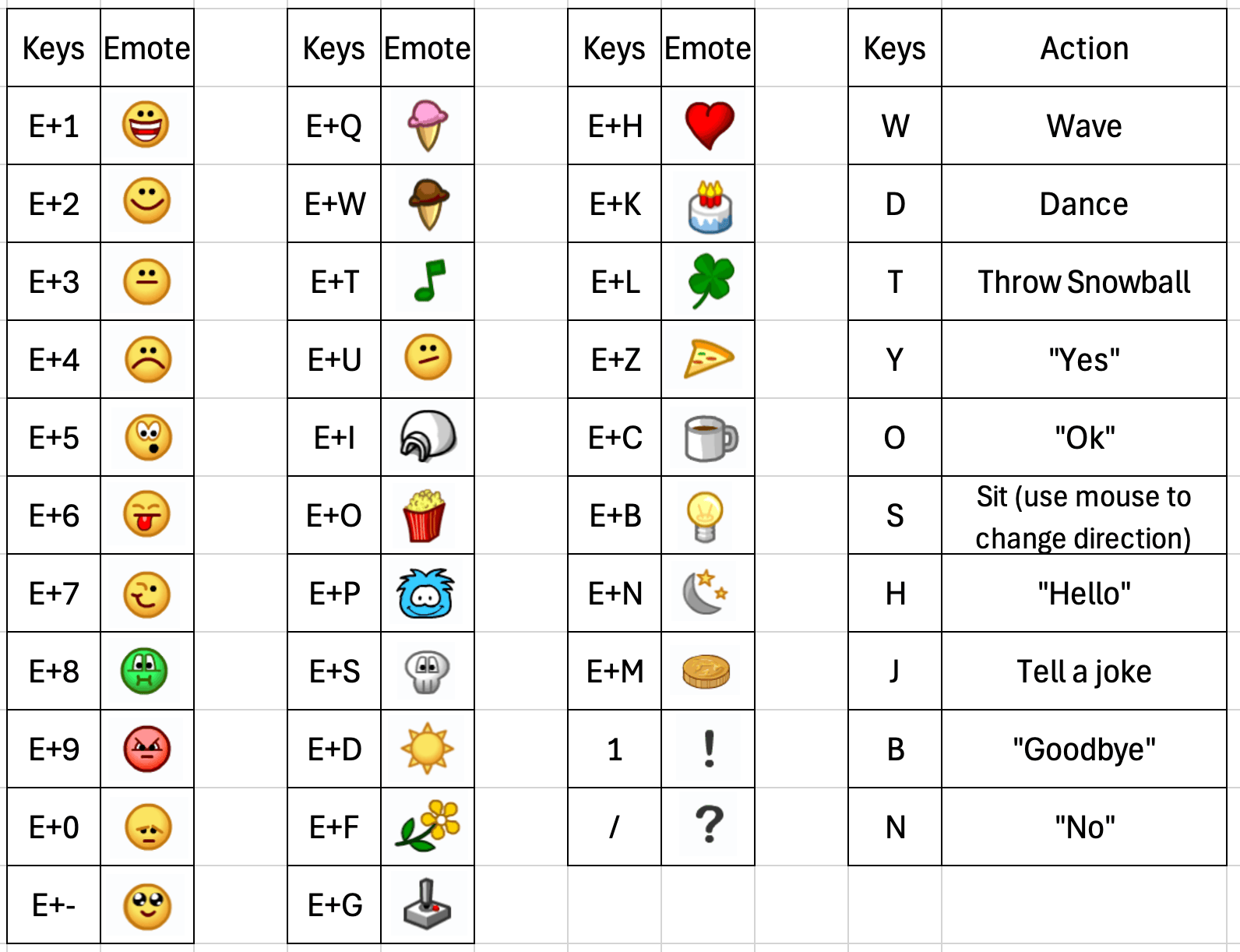
Most emojis have their own key combination, so you can skip the menu entirely. Our cheat sheet below keeps every shortcut close at hand, and the new Hotkeys tab in the settings lists them in game too.
New Chat Log (Optional)
The standard chat log is a tab at the top of the screen that you have to click and pull down, and newer messages push older ones out. The optional new chat log works differently, because it opens along the right side and shows far more history without blocking the middle of the screen.
The bottom chat bar disappears while the log is open, and the input field moves to the bottom of the log instead. Turn it on in the new Chat tab of the game settings (the question mark at the bottom of the screen) and relog, as the change only applies after that. You can now choose between the classic middle chat log, a right chat log and a left chat log.


Hide the User Interface
Tap the ; key to hide or bring back the entire interface in one go, covering the moderator, newspaper, map and postcard icons and the chat bar. Clean screenshots are the obvious use, so keep it in mind. The Display tab in the settings has a Hide Interface option too, so you can switch it on there instead.

Full Screen Mode
Hit the box icon at the top left of the settings menu to fill your whole screen. Click it again or press Esc to return to a window. The Display tab also has Start in Fullscreen, so the game fills your screen as soon as you join.


Low Quality Mode
Does the game lag on your device? Low Quality Mode trims the overall visuals so everything runs more smoothly. Switching it on or off needs a relog, and the change appears on the login screen, so a quieter server should make the relog quicker. Turning it off is the same process: untick the setting and relog. You’ll find it in the Display tab now, and it works exactly as before.
Mini-games have a separate option as well. Press +, – or = to lower their graphics, although the difference is subtle. Card-Jitsu and Infinite Tower are the two games without a low quality mode.

Taking Screenshots
Open the settings menu and click the camera icon near the top right. The game asks if you’d like to hide the interface and penguins, so pick Yes for a clean shot of the room or No to keep everything visible. New pins and other room features show up either way.

Files land in your Downloads folder with “CPJourney” and the date and time in the name. They’re easy to lose there, so rename them and move them to a folder of their own.

Counting Penguins in the Room
Counting penguins for a stamp or group quest can be tedious, but this handy shortcut is one of the neatest Club Penguin Journey secrets around. Open your Buddy List and click Show Online, so the game lists every penguin in the room with you. Each page holds 8 names, so click the down arrow, count the full pages and multiply by 8. Add the names on the last page if it isn’t full, and you have your answer.
Checking the Server and Queue
Wondering how busy the island is? Type !users into the chat, and a pop-up shows how many penguins are online and how many are waiting in the queue.

Finding Your Penguin Number
Can’t remember your penguin number? Type !id into the chat, so a pop-up shows your ID.
Friend Requests After Someone Leaves
Missed your chance to add someone before they left the room? Click their name in the chat log and open their profile, even after they’ve gone. You can also visit their igloo (if it’s open), send them a postcard, look at their stamps without sharing a room, or ignore and report them if they bothered you. Remember to switch on the New Chat Log (the right or left option in the Chat tab) first, because this trick needs it. An empty profile means the penguin has been banned.
Feeding Your Puffle in a Crowd
Is someone blocking the feeding station at the Puffle Park? Put them on your ignore list, and your puffle can eat in peace. Remember to un-ignore them afterwards, since they’ll show up again once you reload the game. You can open your ignore list from the new Privacy tab in the settings.
Club Penguin Journey Secrets: The New Settings Menu
A massive UI update has added five new tabs to the settings menu: Audio, Display, Chat, Privacy and Hotkeys. Together they hide dozens of options, so we have rounded up every one of these Club Penguin Journey secrets below. Open the settings (the question mark at the bottom of the screen) and have a look!
Audio Tab
Too much noise? You can now balance the sound exactly how you like, so you do not need every volume switched on at the same time.
- Volume sliders: adjust the master volume, music volume, sound effects volume and mini-games volume separately.
- Unlimited SFX: lets the same sound play over itself. However, it can break the audio, so use it with care.
- Igloo music: choose whether music plays when you enter other penguins’ igloos.
- Mute in other tabs: silences the game when you switch to a different browser tab.

Display Tab
The Display tab is the biggest of the five, so we have split it into two parts.
Look and Performance
- UI Theme: switch to a different version of the interface, as long as you bought it while Captain Crimson was on the island.
- Low Quality: works the same as before, so check our Low Quality Mode tip for the details.
- Weather: choose full effect, light effect or no effect for snow and other weather in rooms.
- Start in Fullscreen: makes the game open in full screen when you join.
- Hide Interface: hides the interface, as we explained in our Hide the User Interface tip.
- Frame Rate: pick uncapped, 60 FPS or 30 FPS.
- FPS and Ping: show your frame rate and ping in the game.
- Sharp Scaling: makes pixels smoother and crisper when the screen is stretched.
- Reduce Motion: stops looping room animations and bouncing buddy pop-ups.
- Reduce Flashing: stops flashing igloo items, such as flares, lasers and confetti.

Hiding Other Players and Things
- Other players: choose to hide nobody, penguins, buddies or mascots.
- Hide Usernames: hides the usernames in the room.
- Keep Buddy Names: keeps your friends’ name tags showing when you hide all other usernames.
- Hide Snowballs: hides snowballs thrown by other penguins.
- Hide Walking Puffles: hides other penguins’ puffles when they take them for a walk.

Chat Tab
Plenty of new options now make every message easier to read, so tweak them until the chat feels right.
- Chat Log: choose the classic middle chat log, a right chat log or a left chat log.
- Timestamps: show the time beside every message, and turn on 24 Hour Time if you prefer it.
- Chatlog Opacity: change the opacity from 100% down to 30%.
- Hide Chat Bubbles: shows messages in the chat log only.
- Hide Emotes: hides emotes and emote bubbles over penguins.
- Chat Text Size: pick small, medium or large.
- Bold Chat Text: gives chat bubbles and chat logs thicker letters.
- Bubble Time: decide how long a bubble stays up, with short (2.5 seconds), normal (4.5 seconds) or long (7 seconds).
- Bubble Opacity: works like chatlog opacity, but for bubbles.
- Buddies Only: hides messages from penguins who are not on your friend list.
- Highlight My Name: marks messages that say your username.
- Mention Sound: rings a bell when someone says your username.

Privacy Tab
Want some peace and quiet? The Privacy tab puts you in control of who can reach you and find you.
- Friend requests, postcards and mascot postcards: turn each one off if you do not want them.
- Appear Offline: shows you as offline even while you are online.
- Find Buddy: turn it off so your friends cannot see where you are in the game.
- Player Search: turn it off so people cannot find you on the server list.
- Igloo visits: stop your buddies from visiting your igloo even when it is locked.
- Silence Notifications: silences every notification, including log-in pop-ups and friend request pop-ups.
- Ignore List: open your ignore list from this tab.

Hotkeys Tab
The Hotkeys tab simply shows the hotkey for every emote and action, so you never need to memorise them. It also pairs well with our emoji keybinds cheat sheet.

Club Penguin Journey Secrets: Customization Tricks
Layering is one of the best Club Penguin Journey secrets for outfits and igloos, and it’s simple once you know where to click.
Clothing Layering
Items for the face, neck, head, body and hand slots can all be layered, so outfits get creative fast. The Safety Vest and Tuba make a good example. Put the Safety Vest on first and a sunglasses icon appears beside the items in that category, then click the icon next to the Tuba to layer it underneath/over.

Scrolling Through Your Clothing Fast
The mouse wheel won’t scroll your clothing inventory, but you can still zip through your items. Click and drag the scroll-bar handle instead, so a huge wardrobe takes seconds rather than minutes.
Furniture Layering
One piece of furniture can sit on top of another, like a Table on a Rug. Place the rug where you want it, then drop the table as close as possible to the spot where it should sit.
Right-click either item to move it, and arrows appear. The up arrow sends it towards the back of the igloo, while the down arrow brings it towards the front. Keep clicking the down arrow until the table lines up on the rug.

Removing Furniture Fast
Right-click a piece of furniture to select it, then press Del or Backspace to remove it. You can also select multiple items and remove them all at once, so redecorating is much quicker.
Scrolling Through Furniture Fast
Flicking through your furniture with the arrow buttons takes a while when you own a lot. Use your mouse wheel or scroll on your trackpad instead, so you can cycle through the list much faster.
Edit Your Stampbook
Open your stampbook and click the pencil in the bottom right corner to start decorating it with the stamps, secrets and pins you’ve collected. Items can be layered on top of one another and rotated with the left and right arrow keys. Click Save in the bottom right corner when you’re finished.

Club Penguin Journey Secrets: Hidden Catalogs
Some catalogs hide in plain sight around the island, and they rank among the best Club Penguin Journey secrets, because each sells items you won’t find in the main shops. Prices below are all in coins, so you can budget before you shop. Every mini-game upgrade has its own catalog too, and a few upgrades are required for stamps.
Music Catalog (Lighthouse)
Regular Items
The Lighthouse sells all the instruments:
- Blue Electric Bass – 500 coins
- Tuba – 600 coins
- Red Electric Guitar – 550 coins
- Acoustic Guitar – 500 coins
- Drumsticks – 120 coins
- Snare Drum – 380 coins
Secret Items
This page also hides one secret:
- Trumpet – 250 coins

F.I.S.H Catalog (PSA Headquarters)
Becoming a Penguin Secret Agent is the first step, so open the F.I.S.H handbook at PSA Headquarters afterwards and check pages four and five.
Regular Items
- Sunglasses – 200 coins
- Bowtie – 50 coins
- Suit Jacket & Shirt – 650 coins
Secret Items
- Night-Vision Goggles – 1,000 coins
- Black Tie – 125 coins


👉 Read our full PSA Agent Guide here!
Martial Artworks Catalog (Ninja Hideout)
Reach Black Belt in Card-Jitsu before anything else, so beat Sensei if you haven’t yet. Walk through the stone door with symbols into the Dojo area, where the catalog sits on your right above the Card-Jitsu deck. Click the book to open it.
Regular Items
- Ninja Outfit – 1,000 coins
- Amulet – 200 coins
- Goldsmith Apron – 100 coins
- Cloud Wave Bracers – 250 coins
- White Gi – 800 coins
- Tea Table – 650 coins
- Dojo Igloo – 5,000 coins
- Rice Paper Wall Screen – 500 coins
- Stone Lantern – 575 coins
- Hand Gong – 400 coins
Secret Items
- Puffle Ninja Mask – 500 coins
Buying everything, including the secret mask, comes to 9,975 coins.

👉 You can also read our full Card-Jitsu Stamp Guide here!
Sled Racing Game Upgrades (Ski Hill)
Regular Items
- Toboggan – 300 coins
- Pink Racing Sled – 300 coins
- Green Racing Sled – 300 coins

Ice Fishing Game Upgrades (Ice Pond)
Regular Items
- Flashing Lure Fishing Rod – 200 coins
You’ll need this rod to finish every Ice Fishing stamp.

👉 You’ll also find every stamp in our Ice Fishing Stamp Guide →
Hydro-Hopper Game Upgrades (Docks)
Regular Items
- Yellow Arrow Wakeboard – 300 coins
- Pink Striped Wakeboard – 300 coins

DJ3K Game Upgrades (Night Club)
Regular Items
- Funky Record – 75 coins
- Jungle Record – 75 coins
- Festival Record – 75 coins
- Desi-bel Record – 75 coins
- House Bled Record – 75 coins
- Monster Muzak – 75 coins
- Reggaetron Record – 75 coins
Secret Items
- Green Headphones [Puffle Clothing] – 300 coins

👉 Want more puffle items like these? Browse our Puffle Catalog Guide →
Catchin’ Waves Game Upgrades (Cove)
Regular Items
- Daisy Surfboard – 400 coins
- Flame Surfboard – 400 coins
Secret Items
- Silver Surfboard – 800 coins
An upgraded board is also needed for every Catchin’ Waves stamp.

👉 You can also ride every wave with our Catchin’ Waves Stamps Guide →
Cart Surfer Game Upgrades (Mine Shack)
Regular Items
- Flaming Spray Can – 400 coins
- Rebellious Spray Can – 400 coins
- Amphibious Spray Can – 400 coins
- Sweet Spray Can – 400 coins
- Wild Spray Can – 400 coins
- Healthy Spray Can – 400 coins
- Dazzling Spray Can – 400 coins
- Energetic Spray Can – 400 coins
- Daring Spray Can – 400 coins
Overall, nine spray cans are for sale in the Mine Shack, and every one costs 400 coins, so the full set comes to 3,600 coins.

👉 You can also find every stamp in our Cart Surfer Stamp Guide →
Club Penguin Journey Secrets: Hidden Pins
Two hidden pins unlock secret rooms, and Jigsaw Jam hands out four more, which makes them some of the best Club Penguin Journey secrets for collectors.
Rockhopper’s Key Pin (Book Room)
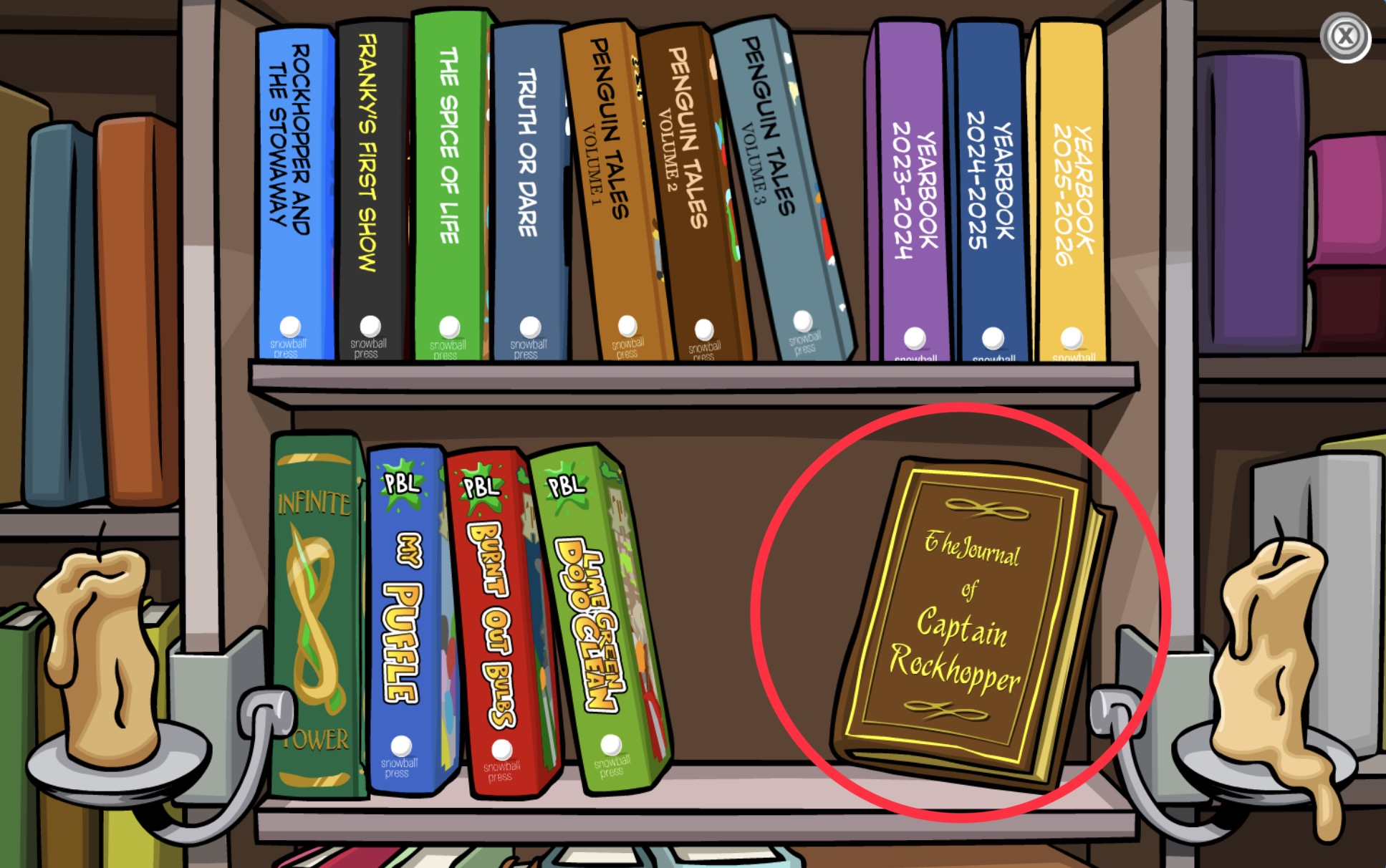
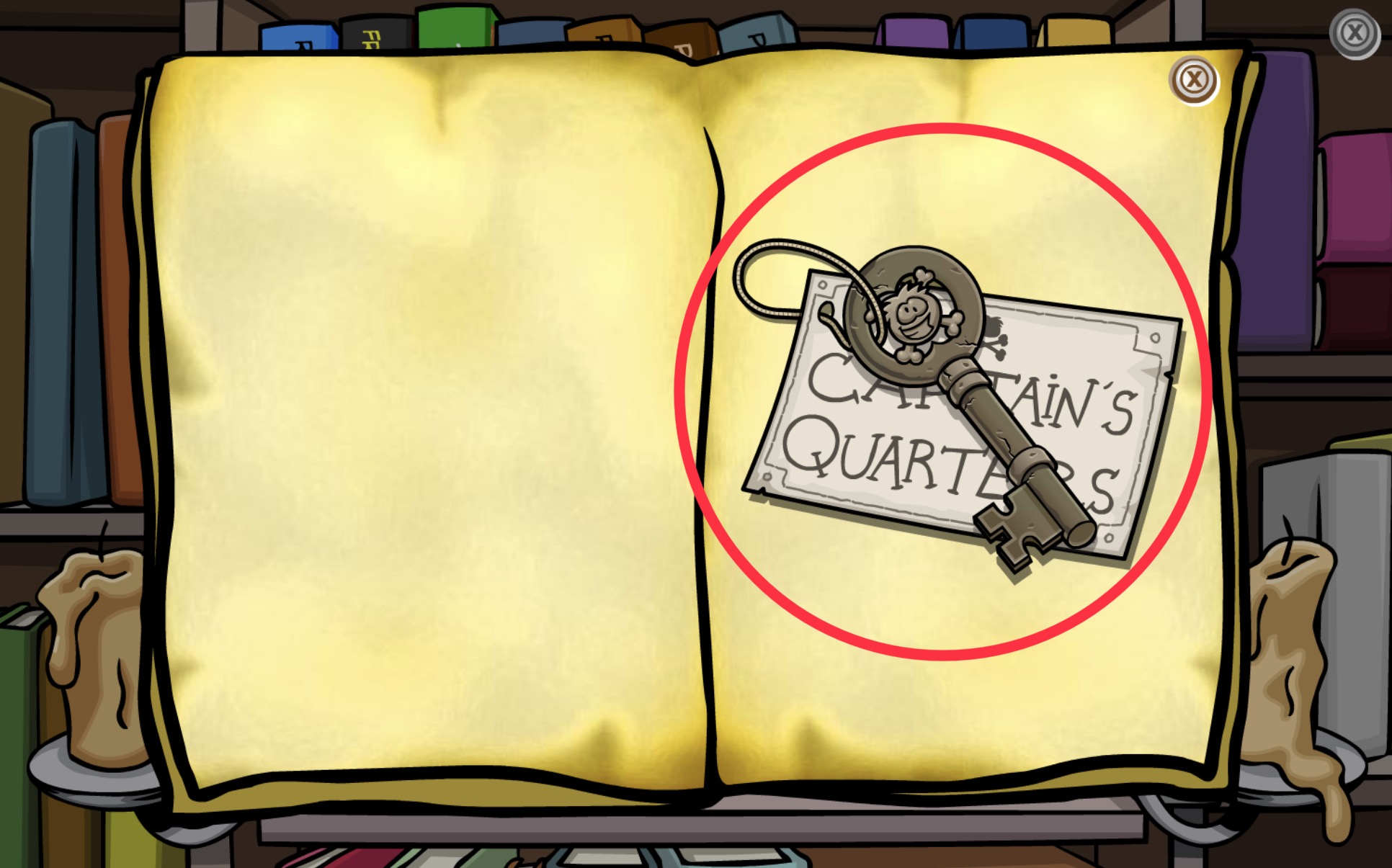
Open The Journal of Captain Rockhopper in the Book Room and turn to the last page, where the pin is hiding. It unlocks the Captain’s Quarters on the Migrator as well.
Moss Key Pin (Puffle Rescue)
The Moss Key is a pin you can only get through Puffle Rescue, and it gives you permanent access to the Underwater room. Start with Level 1 of the sea levels and rescue the puffle, so the Giant Squid appears and swims out to sea, leaving a trail of bubbles. Follow the bubbles along a long stretch of deep water to a coral reef far out at sea. A small alcove at the reef has a staircase leading to the Underwater room, where you click the Moss Key Pin to collect it. The squid only appears on Level 1 of the sea levels, and only until you’ve collected the pin.
👉 Every level is also covered in our Puffle Rescue Stamp Guide →
Jigsaw Jam Pins (The Lookout)
Jigsaw Jam has four pins you can collect, but you’ll need to go through Tour HQ to reach the Lookout. Each of the first three comes from finishing a set of 36 puzzles, and you can collect them with the pin icon in the top-left corner afterwards.
Jigsaw Jam Completionist Pin – complete the first set of 36 puzzles
Emerald Piece Pin – complete the second set of 36 puzzles
Ruby Piece Pin – complete the third set of 36 puzzles
Jigsaw Jam Featured Artist Pin – get your own artwork featured in the game

👉 You can also get help with the puzzles in our Jigsaw Jam Guide →
Club Penguin Journey Secrets: Hidden Rooms
Four hidden rooms are tucked away around the island, and two exist only in this game, so these Club Penguin Journey secrets will get you inside.
Underwater Room
Permanent access comes from the Moss Key pin, which you earn through Puffle Rescue (see the Moss Key Pin above). Move the boulder in the Forest with your cursor to reveal a ladder down to the Hidden Lake. The right side of the Cave Mine also leads there.

Captain’s Quarters (Ship Hold)
Rockhopper’s visits are the only time this room is open, so time it well. You need Rockhopper’s Key, and the way in is through the Migrator.

Old Boiler Room
Click the Boiler in the Boiler Room to step into the Old Boiler Room, which is exclusive to Club Penguin Journey.


Gift Shop Office
The door at the bottom left of the Gift Shop leads inside. This office is exclusive to Club Penguin Journey, so you won’t find it anywhere else.


Club Penguin Journey Secrets: Hidden Items
A lot of the game’s best items never appear in a shop window, so these are the Club Penguin Journey secrets worth hunting for.
Like My Igloo Paint (Gift Shop Catalog)
Turn to page three of the Gift Shop catalog and click the yellow puffle’s paintbrush to buy this item for 400 coins. Take off all your other clothing, then press W or wave to hold up the sign.

Viking Helmets (Gift Shop Catalog)
The Penguins at Work page hides four helmets: Viking, Blue Viking, Gold Viking and Neon Purple Viking. Click the Penguins at Work symbol a certain amount of times to unlock them. They also feature in every Penguin Style Catalog. *Note that the Haunted Viking Helmet may only be available at Halloween rather than all year round*
Viking Helmet – Click the sign once – 750 coins
Blue Viking Helmet – Click the sign 4 times – 1200 coins
Gold Viking Helmet – Click the sign 6 times – 1500 coins
Neon Purple Viking Helmet – Click the sign 16 times – 2000 coins
*Haunted Viking Helmet – Click the sign/grave 31 times – 2000 coins

Friendship Bracelet (Book Room)
Head into the Coffee Shop and upstairs to the Book Room, then open Rockhopper and the Stowaway on the Book Shelf. Flip to the final page for a free item.


The Four Golden Items
Four golden items are hidden around the island, and each one earns you a secret stamp, so here’s where to find them:
Solid Gold Viking Helmet – The Stage (press buttons on the Switchbox 3000)
Gold Bunny Slippers – The Boiler Room (throw snowballs in the right order)
Goldstache – The Cove (click the binoculars, then catch the yellow fish)
Gold Surfboard – The Cove (click the right letters in the Game Upgrades catalog)
👉 Every step and screenshot is also in our full Golden Items Guide →
Club Penguin Journey Secrets: Infinite Tower
Infinite Tower first showed up at the Medieval Party of 2025, but you don’t need a party to play it. Click the shelf in the Book Room and you can play whenever you like. It’s one of the best hidden gems among all the Club Penguin Journey secrets.


👉 You can also climb for stamps with our Infinite Tower Guide →
Club Penguin Journey Secrets: Elite Penguin Force
Finish every PSA mission at PSA Headquarters to unlock the Elite Penguin Force. Its exclusive mission, Operation: Mayday, rewards one background and two pins, and all three are listed below so you won’t miss any of these Club Penguin Journey secrets.
Herbert’s Operation Mayday Giveaway Background – complete the mission
Expedition Key – picked up and used to reach Herbert’s Lair, then kept as a pin
Hardware Destroyer – a tool that helps you complete the mission and stays as a pin afterwards

👉 Every step of the mission is also in our Operation: Mayday Guide →
Club Penguin Journey Secrets: Mascots and Meet-Ups
What Are Mascots?
Mascots are famous faces from the game’s history and lore, and they drop into the island every so often to say hello to players. Every one has a personality of their own, although a mascot can take on a different name or role depending on the party they’re hosting. Learning how to track them down is one of the best Club Penguin Journey secrets.
Nearly every party brings at least one mascot, either during the event itself or while the island is still under construction. It’s worth the effort to find them, because your first meeting in a room on the island earns you a stamp. Better still, you can claim a free background (often an exclusive one), receive a friend request and postcards, and sometimes pick up lore and hints about upcoming events.
How to Spot a Mascot
Mascots stand out from regular players in four ways, so you don’t need to memorise them all, and here are the four Club Penguin Journey secrets for spotting one:
Name outline – their username shows up in bold white text
Bigger shadow – a large coloured circle sits under the avatar
Coloured chat bubbles – their messages appear above nearby chats, so they’re easy to read
Player card design – custom artwork replaces the standard card, with claiming their free background as the only action left

Some mascots swap names for certain parties too. Jet Pack Guy became Guy after losing his jetpack at the April Fools Party 2025, while Gary turned into Sir Gary for the Medieval Party in 2024. Sensei even debuted a drag persona called Senslay at the April Fools Party 2024.
How Meet-Ups Work
Nearly every meet-up is unscheduled, so the day, time and server stay a surprise. Staff do reveal which mascot is coming, either ahead of the party or once it begins. A mascot usually stays online for 40 to 60 minutes on one of the four servers, and visits tend to land in the afternoon or evening PST.
Each mascot logs on in a random room, so finding them is a race! Meet them there for the first time to earn a stamp and a friend request, then claim the free background from their player card. Afterwards, mascots wander from room to room with a huge crowd in tow, chatting, roleplaying and joining activities.
Expect multiplayer mini-games like Mancala, Find Four, Sled Racing or Card-Jitsu, plus hide-and-seek and fashion shows. Mascots may also nudge players towards community quests or party activities, and their postcards reach everyone in the room at once.
Wrap-up begins 5 to 15 minutes before they leave, and a departure is always announced. A mascot who vanishes mid-chat has most likely lost connection and should return shortly.

Claiming Mascot Backgrounds
Mascot party backgrounds can be claimed straight from your buddy list, which has worked since October 2025. Add the mascot as a friend first and wait for their first login of the party, because the background then stays claimable until the party ends, even while they’re offline. It’s one of the easiest Club Penguin Journey secrets for background collectors.
Most mascot backgrounds are exclusive to their party and never return, so don’t leave it too late. Evergreen backgrounds, such as Rory’s, are the exception, because they come back for several events so newcomers can grab them. A new background that won’t claim usually means the mascot hasn’t visited the island yet.

Tips for Meeting Mascots
Want to catch every visit? Keep these Club Penguin Journey secrets handy.
Use a tracker – our Discord server has a mascot tracker channel that shows you when one arrives
Stay in the queue – queues often move quicker than expected, so only leave once the mascot has logged off
Pick your timing – the first meet-ups are the busiest, whereas the middle or end of a party and quiet PST hours mean shorter queues
Use your buddy list – if you can’t spot a mascot, open their player card from the buddy list or the Users in Room list
Star your favourites – click the star beside a mascot’s name, and they’ll sit at the top of your buddy list while you’re both on the same server
Hold Alt – slip through the crowd without opening other penguins’ player cards

Who Are the Mascots?
17 mascots can currently visit the island, so here’s the full cast. A few have signature parties, which makes it easier to guess who might show up.
Secret Agents and Their Enemies
Dot – the Elite Penguin Force’s style icon, famous for running huge fashion shows at her meet-ups
Gary (G) – the Penguin Secret Agency’s genius inventor, whose Halloween meet-ups often involve grabbing a Pumpkin Spiced Latte from the Coffee Shop
Jet Pack Guy (JPG) – the agency’s top aerial agent, who looks serious but loosens up and has fun at his meet-ups
Rookie – a naive, silly secret agent who is simply doing his best, usually seen at the Fair and April Fools parties
Herbert P. Bear – the cold-hating villain and enemy of the PSA and EPF, who sometimes crashes PSA and EPF-themed events
Klutzy – Herbert’s loyal and surprisingly clever crab sidekick, usually by his side with the catchphrase “CLICK CLICK!”
The Penguin Band
Cadence – the island’s top DJ and dancer, and a Penguin Band collaborator who shines at Music Jam but sometimes plays concerts at other parties
Franky – a brilliant guitarist who hangs out with his bandmates and even stars in his own story in the Book Room
G Billy – a pro drummer, normally seen at music events like Music Jam
Petey K – a gifted musician on guitar, piano and accordion, who turns up alongside the rest of the band
Stompin’ Bob – the laid-back bassist, who may put on concerts with Cadence outside music parties
Island Favourites
Aunt Arctic (AA) – the Club Penguin Times editor-in-chief, a regular at anniversary parties who loves Earth Day
Puffle Handler (PH) – the island’s favourite puffle expert from Down Under, usually at Puffle Parties but an unexpected guest at the 2024 Holiday Party
Rockhopper (RH) – the beloved pirate captain of the Migrator, whose next visit you can predict by checking the Beacon’s telescope
Rory – the island’s hardest-working builder, often seen before big parties getting everything decorated
Sensei – Card-Jitsu’s master and mentor to the island’s ninjas, a star of Card-Jitsu parties who loves showing off his haiku
Tourdude – a totally radical tour guide who seems to have vanished, last seen at Camp Penguin in 2024

Mascot FAQ
Do mascots favour a particular server?
Not really. A packed server is a less likely pick, though, and a mascot will seldom land on the same server two visits running.
How often do mascots visit?
Expect a visit every two days at the very least. Glitches can hold them up, but bonus meet-ups usually cover the gap.
Do mascots visit outside parties?
Mostly no, since parties are where they shine. Rory breaks the pattern by popping in while the island is still being built before a big event.
What time do meet-ups happen?
The schedule shifts from one meet-up to the next, because staff try to suit players in every timezone.
Can several mascots meet at once?
Yes, a few mascots team up for joint meet-ups. The 2nd Anniversary Party even ran panels with up to four of them answering questions together.
Should I switch servers if the queue is long?
Hopping to another server is a kind move when the queue drags, though nobody will mind if you stay put.
Do I get any stamps for meeting mascots?
Each of the 17 mascots has a stamp named after them, so meeting each one adds another to your stampbook, but only when the mascot has arrived on the island and you enter their room to meet them.
Club Penguin Journey Secrets: Party Stamps
Parties come with their own stamps, and some of them only return when their party does. Here are 24 party stamps sorted by difficulty, so you know what to chase at the next event.
Some of these stamps may not be available until their party comes back. Go Green and Happy Room are the exceptions, because they are not tied to a party.
Easy Stamps
Party Puffle Stamp

Bring your furry friend along, because you need to walk your puffle to their party room to earn this one. It’s a cute stamp for puffle lovers, so make it part of your next Puffle Party.
Construction Stamp

Time to get your hands dirty, so equip your jackhammer and join the construction at a party to earn this stamp.
Explorer Stamp

Explore every corner of the island, because you need to visit all the decorated rooms during a party. Take your time and keep a list, so you don’t miss any.
Go Green Stamp

Help the island stay tidy and recycle 10 objects at the recycling plant. Unlike most party stamps, this one isn’t tied to a party, so you can earn it all year!
Celebration Stamp

Make a wish, because you need to blow out the candles on the anniversary cake to earn this stamp. It belongs to the Anniversary Party, so look for it there!
Out to Sea Stamp

All aboard! Sail away from the island on a boat to earn this one!
Food Fight Stamp

Things are about to get messy, so throw your meal in a room where food is found and earn this stamp.
Snack Shack Stamp
Play waiter for a moment, and serve another penguin snacks from a food booth using a food emote to earn this one.
Snowboarder Stamp

Hit the slopes in style, because you need to do a snowboard dance at a party using any snowboard.
Medium Stamps
Path Finder Stamp

Can you find your way out? Complete a maze at a party to earn this one.
Happy Room Stamp

Spread the smiles by getting into a room with 10 penguins using the smile (E+2) emoji. Like Go Green, this stamp isn’t tied to a party, so gather your friends and give it a go.
Target Champion Stamp

Sharpen your aim, because you need to hit 50 targets in a task at a party.
Monster Mash Stamp

Go monstrous and wear a monster outfit to earn this stamp. It comes from the Halloween Party, and the Monster Maker catalog is where you can create one.
Scavenger Hunt Stamp

Grab your detective hat and complete a scavenger hunt at a party to earn this one.
Noble Knight Stamp

Suit up in a knight costume for this stamp, which comes from the Medieval Party.
Tree Mob Stamp
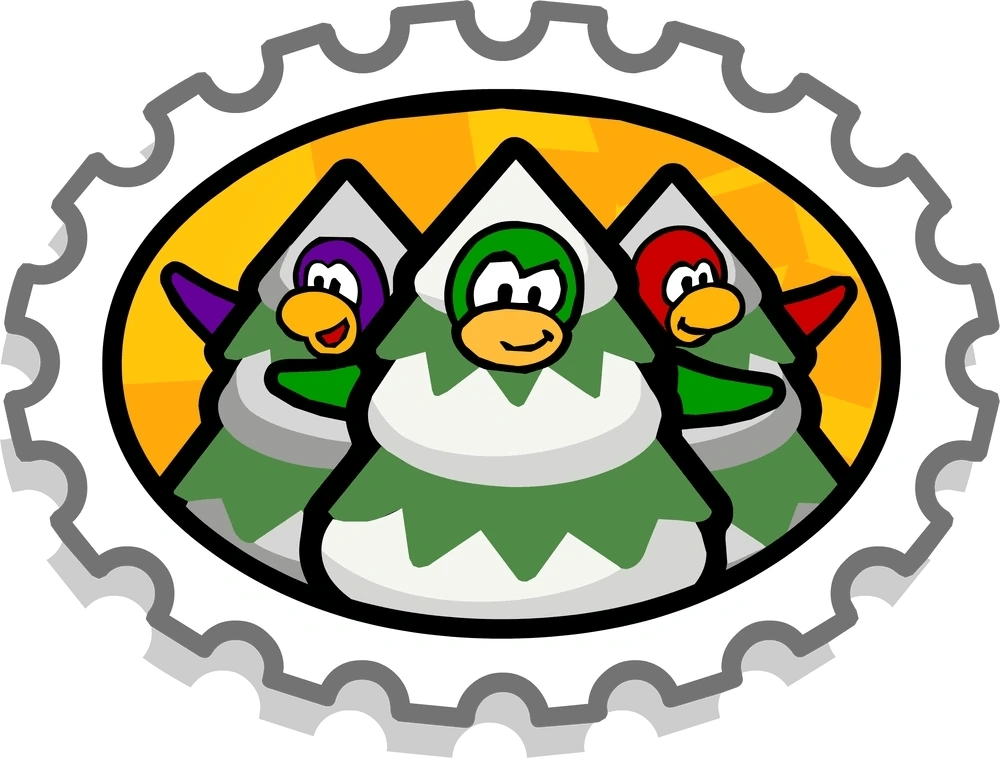
Gather a crowd and wear a tree costume with 10 or more penguins. Call your friends, because you can’t do this one alone.
Music Maestro Stamp

Keep your ears open and solve a musical puzzle at a party to earn this one.
Party Puzzle Stamp

Put your thinking cap on and solve a puzzle at a party to earn this stamp. The Halloween party version comes from the same musical puzzle as Music Maestro.
Hard Stamps
Top Volunteer Stamp

Be generous at the Holiday Party and give a 5,000 coin donation to Coins for Change to earn this stamp.
Mountaineer Stamp

Hard for a reason as you have to climb high and reach a mountain peak to earn this one! It’s only been available for two parties so far, so keep an eye out!
Extreme Stamps
Epic Volunteer Stamp

Feeling extra generous? Give a 10,000 coin donation to Coins for Change at the Holiday Party to earn this stamp.
Legendary Volunteer Stamp

Only the most generous penguins will manage this one, because you need to give a 25,000 coin donation to Coins for Change at the Holiday Party.
Ultimate Fan Stamp

Grab a front-row spot and attend a live concert during a party to earn this stamp.
Elite Operative Stamp

Suit up like a true secret agent and complete an EPF operation during its party to earn this stamp.
📚 More Guides
Looking for more Club Penguin Journey guides? Check out these pages for hidden items, catalog secrets, coin tips and mini-game walkthroughs!

Misc. Catalogs and Guides
Explore more catalogs, hidden clothing items, furniture secrets and other useful Club Penguin Journey guides.

Mini-Game Guides
Need help earning stamps or collecting coins? Browse our mini-game walkthroughs for tips, strategies and stamp guides.

November Penguin Style Secrets
Discover hidden clothing items and secret catalog cheats in the November 2026 Penguin Style Catalog with our complete guide.

Ultimate Coin Guide
Learn every way to earn coins, from minigames and jobs to AFK mining and monthly pay, and stack bonuses for up to four times the coins.
Thanks for Reading about These Club Penguin Journey Secrets!
That’s a lot of secrets uncovered, so you’re now ready to crowd surf, layer like a pro, spot every mascot and chase every party stamp. We hope these Club Penguin Journey secrets save you time and shows you a few things you never knew the game could do, so go and try them all, penguins!
Which trick surprised you the most, and do you know one we’ve missed? Tell us in the comments, because we’d love to add it to our list of Club Penguin Journey secrets, and give this guide a like if it helped! Want more guides, news and updates? Join our Discord server, because we’d love to see you there!
Kyle
Filed under: Club Penguin Journey, Dark Warriors, Misc. Catalogs & Guides | Tagged: Club Penguin Journey secrets, CPJ Hidden items, CPJ Tips And Tricks, Elite Penguin Force, Game Upgrade Catalogs, Hidden Catalogs, Hidden Pins, Hidden Rooms, Igloo Tips, Infinite Tower, Jigsaw Jam Pins, Mascot Backgrounds, Mascot Guide, Mascot Meet-Ups, Moss Key Pin, Party Stamps, Quality Of Life Tips, Rockhopper’s Key Pin, Secret Items, Underwater Room |


Man I love stealing
This is fire
Omg bruh this is actually so peak, ive been doing trivia games on cpj and struggled tracking points abit cz the old chat log didnt go that far back, now ik that there’s a new chatlog that makes things wayy easier! Tysm!
OMG I HAD NO IDEA YOU COULD CHOOSE THE ORDER OF FURNITURE ON CPJ!! IVE ALWAYS WANTED SOMETHING LIKE THIS AND ITS ACTUALLY A THING LETS GOOO
[…] 👉 Keep exploring with our Club Penguin Journey Secrets Guide → […]
im tryna get that puzzle pin, but seems like it’d take so longggg T-T ty for the guide!
[…] Club Penguin Journey… on Club Penguin Journey Puffle Ca… […]
[…] 👉 Want every trick? Read our Club Penguin Journey Secrets Guide → […]